Introduction
You open Facebook, scroll past a few posts, and there it is. A couch for half price. A bike your kid has been begging for. A job lead from someone two streets away. This is Facebook Marketplace, and millions of people check it every single day. It feels like a garage sale that never ends, except your neighbors from every corner of the city show up too.
Facebook Marketplace has quietly become one of the biggest places to buy and sell items online. You do not need a special app. You do not need to pay a listing fee in most cases. You just need a Facebook account and a little patience.
This article walks you through everything you need to know. You will learn how Facebook Marketplace works, how to buy and sell with confidence, how to avoid scams, and what to do when something goes wrong. Let us get into it.
What Is Facebook Marketplace?
Facebook Marketplace is a section inside the Facebook app and website where people list items for sale. Think of it as a mix between Craigslist and an online yard sale, built right into a platform you already use.
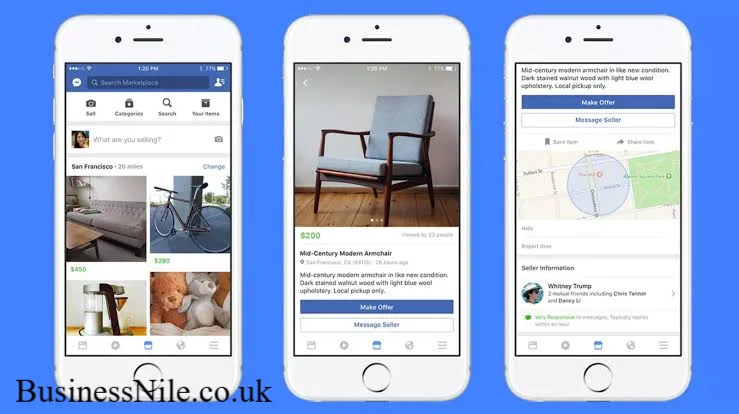
You can find almost anything there. Furniture, cars, clothes, electronics, rental homes, even services like tutoring or photography. Sellers post a photo, a price, and a short description, and buyers reach out through Facebook Messenger.
Facebook launched Marketplace in 2016, and it grew fast because it removed a big barrier. Instead of creating a new account on a separate site, you simply tap a tab you already have open.
How Does Facebook Marketplace Work?
Facebook Marketplace connects buyers and sellers based on location. When you open it, you mostly see items listed near you, though you can also browse further away or shop through nationwide shipping options.
Here is the basic flow.
- A seller creates a listing with photos, a price, a category, and a location.
- The listing shows up to nearby users browsing Marketplace.
- A buyer messages the seller directly to ask questions or arrange a meetup.
- They agree on a price, a payment method, and a pickup spot.
- The item changes hands, often in person, sometimes through shipping.
Facebook does not usually get involved in the transaction itself unless you use their shipping and checkout tools for certain categories. Most local deals happen the old fashioned way, cash and a handshake.
Categories You Will Find
Marketplace organizes listings into groups such as vehicles, property rentals, apparel, home goods, electronics, hobbies, and free items. You can filter by category, price range, distance, and condition, which makes searching much faster.
How Do I Buy Items on Facebook Marketplace?
Buying is simple once you know the steps.
- Open Facebook and tap the Marketplace icon, usually a small storefront symbol.
- Browse the feed or type what you want into the search bar.
- Tap a listing to see full photos, the price, the description, and the seller’s profile.
- Message the seller to ask questions or confirm the item is still available.
- Agree on a time and place to meet, or arrange shipping if offered.
- Pay and collect your item.
A quick personal tip. I always message the seller before getting excited about a listing. Prices change, items sell fast, and a quick message saves you a wasted trip.
How Do I Sell on Facebook Marketplace?
Selling on Facebook Marketplace takes just a few minutes.
- Tap Marketplace, then select Create New Listing.
- Choose a category like Item for Sale, Vehicle, or Home Rental.
- Add clear photos from a few angles, good lighting matters more than you think.
- Write an honest description including size, condition, and any flaws.
- Set a fair price based on similar listings nearby.
- Choose your location and whether you allow shipping.
- Publish the listing and respond quickly to messages.
Fast responses lead to faster sales. Buyers move on quickly if a seller takes days to reply.
Is Facebook Marketplace Free to Use?
Yes, listing most personal items on Facebook Marketplace is free. You will not pay a fee to post a couch, a bike, or clothing for local pickup.
Fees only apply in specific situations, such as selling through Facebook’s shipping checkout for certain product categories, where a small selling fee may apply to cover payment processing and support. Local, in person transactions between individuals typically stay free on both sides.
Is Facebook Marketplace Safe?
Facebook Marketplace is generally safe, especially for local deals where you meet in person and inspect the item before paying. Millions of transactions happen smoothly every week.
That said, it is not risk free. Because anyone with a Facebook account can list or buy, scams do happen, just like on any open marketplace. Knowing the warning signs makes a huge difference.
How Do I Avoid Scams on Facebook Marketplace?
A little caution goes a long way. Follow these practices to keep yourself protected.
- Meet in a public, well lit place, ideally during daylight hours.
- Bring a friend along for higher value items.
- Avoid sending payment before you see the item in person.
- Be wary of sellers who only accept gift cards or wire transfers.
- Check the seller’s profile for account age and mutual friends.
- Trust your instincts if a deal feels rushed or too good to be true.
- Use Facebook’s own payment tools when shipping is involved, since they offer buyer protection.
If someone pressures you to act fast or refuses a video call to verify an item, treat that as a red flag.
Can Businesses Sell on Facebook Marketplace?
Yes, businesses can absolutely sell on Facebook Marketplace. Retailers use it alongside their Facebook Shop to reach local customers and shoppers browsing nearby deals. This gives small businesses a low cost way to compete with bigger platforms without building a separate website.
Business listings often show a storefront badge and link back to the company page, which helps buyers verify legitimacy before purchasing.
How Do I Search for Items on Facebook Marketplace?
Searching well saves you real time. Type keywords into the Marketplace search bar, then narrow results using filters for price, distance, condition, and category.
A few search tips that help.
- Use specific terms, such as the exact model name of a phone or appliance.
- Sort by distance if you want quick, nearby pickups.
- Save searches so Facebook notifies you when new matching items appear.
- Check both new and used filters, since great deals hide in unexpected categories.
Why Can’t I Access Facebook Marketplace?
A few common reasons explain this.
- Your account may be new, and Facebook sometimes limits access until trust builds.
- You might live in a region where Marketplace has not fully rolled out.
- Age restrictions apply, since users must meet a minimum age requirement.
- A previous policy violation could temporarily restrict your access.
- App or browser glitches sometimes hide the Marketplace tab entirely.
Updating the app, checking your account standing, or trying the desktop version often solves the problem quickly.
How Do I Ship Items Through Facebook Marketplace?
For eligible categories, Facebook Marketplace supports shipping so you can sell beyond your local area. The process looks like this.
- Create a listing and choose the shipping option instead of local pickup only.
- Set your price including estimated shipping costs.
- When a buyer purchases through checkout, Facebook generates a shipping label.
- Pack the item securely and drop it off using the provided label.
- Once delivered, payment releases to your account, minus any applicable fee.
This shipping option works best for smaller, easy to pack items like clothing, collectibles, and electronics.
What Items Are Prohibited on Facebook Marketplace?
Facebook Marketplace has clear rules about what you cannot list. Prohibited items generally include:
- Weapons, ammunition, and explosives
- Illegal drugs and drug paraphernalia
- Animals and live pets
- Alcohol and tobacco products
- Adult content or services
- Counterfeit goods and stolen items
- Recalled products and hazardous materials
Listings that break these rules get removed, and repeated violations can lead to account restrictions.
How Do I Contact a Seller on Facebook Marketplace?
Simply tap the listing and select the message button. This opens a Messenger conversation where you can ask questions, negotiate price, or confirm availability. Keeping conversations inside Messenger also creates a helpful record if any dispute comes up later.
How Do Facebook Marketplace Ratings Work?
After a transaction, both buyers and sellers can rate each other and leave a short review. These ratings show up on future listings and profiles, helping build trust across the platform.
A strong rating history signals reliability. If you are new to selling, start with smaller items to build a positive track record before listing bigger ticket goods.
Can I Negotiate Prices on Facebook Marketplace?
Yes, negotiating is common and expected on Facebook Marketplace. Many sellers price items slightly higher, anticipating some back and forth.
A respectful approach works best. Offer a fair counter price, explain your reasoning briefly, and stay polite even if the seller declines. Lowball offers often get ignored, while thoughtful ones open real conversations.
Facebook Marketplace vs Craigslist
Both platforms connect local buyers and sellers, but they feel quite different. Facebook Marketplace ties listings to real profiles, which adds a layer of accountability that Craigslist lacks since it allows anonymous posting.
Craigslist still holds strong in certain categories like job postings and services, while Facebook Marketplace shines for everyday items, vehicles, and community deals thanks to its massive built in user base.
Facebook Marketplace vs eBay
eBay focuses on shipped goods with an auction style format and strong buyer protection policies. Facebook Marketplace leans toward local, in person deals with less formal structure.
If you want nationwide reach and detailed seller ratings, eBay often fits better. If you want quick, local, no fuss transactions, Facebook Marketplace usually wins on speed and convenience.
Conclusion
Facebook Marketplace makes buying and selling refreshingly simple. You get a huge local audience, no listing fees for most items, and a familiar app you already check daily. At the same time, staying alert to scams and following safe meeting practices keeps your experience smooth.
Whether you are clearing out a closet or hunting for a weekend project car, Facebook Marketplace gives you a practical, community driven way to shop. Have you had a great or not so great experience with Facebook Marketplace? Share your story, and pass this guide along to a friend who could use it.
Frequently Asked Questions
Is Facebook Marketplace only for local sales? No. Local pickup remains the most common option, but shipping is available for many categories, letting you buy and sell across wider distances.
Do I need the Facebook app to use Marketplace? No, you can access Facebook Marketplace through a desktop browser as well, though the mobile app often feels quicker for messaging sellers.
Can I delete a listing after posting it? Yes, go to your listing, tap the menu, and select delete or mark as sold. This keeps your profile tidy and avoids confused messages from interested buyers.
What payment methods work best on Facebook Marketplace? Cash remains popular for local deals. For shipped items, Facebook’s built in checkout offers safer, trackable payment options.
Why does my listing get flagged or removed? Listings often get removed for violating category rules, using misleading photos, or including prohibited items. Reviewing Facebook’s commerce policies helps prevent this.
Can I use Facebook Marketplace without a Facebook account? No, an active Facebook account is required to browse, buy, or sell on Marketplace.
Is there an age limit for using Facebook Marketplace? Yes, users generally must be at least eighteen years old to buy or sell on Marketplace, in line with Facebook’s overall age requirements.
BusinessNile.co.uk
Email: johanharwewn314@gmail.com
Author Name: Hamid Ali
About the Author: Hamid Ali writes about ecommerce, online marketplaces, and practical digital tips for everyday shoppers and small sellers. He enjoys breaking down complex platforms into simple, useful guides that readers can act on right away.